> For the complete documentation index, see [llms.txt](https://manuais.soluti.com.br/videoconferencia-agendamento-facetec-liveness/llms.txt). Markdown versions of documentation pages are available by appending `.md` to page URLs; this page is available as [Markdown](https://manuais.soluti.com.br/videoconferencia-agendamento-facetec-liveness/preenchendo-informacoes/nao-possui-cnh.md).

# Não possui CNH

1. Caso **não** possua a CNH e deseja utilizar outro documento de identificação, clique em **Não**.

<figure><img src="/files/B3YC9mNsIfm2MYKstfOj" alt=""><figcaption></figcaption></figure>

2. Nesse caso, é necessário confirmar se o cliente possui as biometrias cadastradas no **PSBIO**, através do campo **Verifique se você pode ser atendido por videoconferência**. Digite o CPF no campo indicado e aguarde a confirmação.

<figure><img src="/files/PabAnmNXG0dCBDKItIuE" alt=""><figcaption></figcaption></figure>

3. Se a resposta for **negativa**, o cliente deve se dirigir a uma de nossas lojas para ser atendido presencialmente.

<figure><img src="/files/U9m8cLRIRnNf4TtP7taF" alt=""><figcaption></figcaption></figure>

4. No entanto, se a resposta for positiva, informe seu **voucher/pedido,** em seguida, clique em **Ir ou agendar videoconferência.**

<figure><img src="/files/rNxOUu5fRXGYmmoqUzlO" alt="" width="563"><figcaption></figcaption></figure>

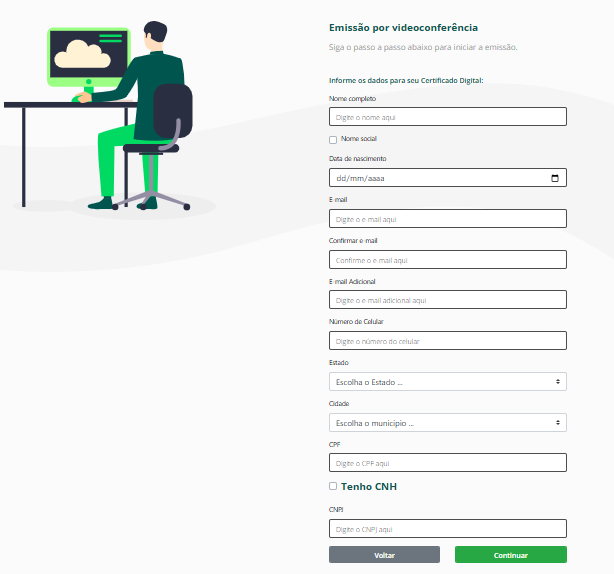
5. Preencha todos os dados solicitados e, em seguida, clique para **Continuar**.

<figure><img src="/files/RVS2cJWfuuE1QHYvs3bv" alt=""><figcaption></figcaption></figure>

5. Nesse momento, é solicitada a criação da **Senha de Emissão e Revogação.**

<div><figure><img src="/files/nWVmNwD47LaiTtuhPAMI" alt=""><figcaption></figcaption></figure> <figure><img src="/files/U8Cp06EqTC1fqhZWcGEF" alt=""><figcaption></figcaption></figure></div>

{% hint style="danger" %}
IMPORTANTE!

Guarde a senha criada em um local seguro, pois você só conseguirá emitir o seu certificado se estiver com a senha de emissão. Caso contrário, será necessário realizar um novo agendamento.&#x20;
{% endhint %}


---

# Agent Instructions
This documentation is published with GitBook. GitBook is the documentation platform designed so that both humans and AI agents can read, navigate, and reason over technical content effectively. Learn more at gitbook.com.

## Querying This Documentation
If you need additional information that is not directly available in this page, you can query the documentation dynamically by asking a question.

Perform an HTTP GET request on the current page URL with the `ask` query parameter, and the optional `goal` query parameter:

```
GET https://manuais.soluti.com.br/videoconferencia-agendamento-facetec-liveness/preenchendo-informacoes/nao-possui-cnh.md?ask=<question>&goal=<endgoal>
```

`ask` is the immediate question: it should be specific, self-contained, and written in natural language.
`goal` is optional and describes the broader end goal you are ultimately trying to accomplish on behalf of the user. GitBook uses it to tailor the answer towards what is most useful for that goal.

The response will contain a direct answer to the question and relevant excerpts and sources from the documentation.

Use this mechanism when the answer is not explicitly present in the current page, you need clarification or additional context, or you want to retrieve related documentation sections.